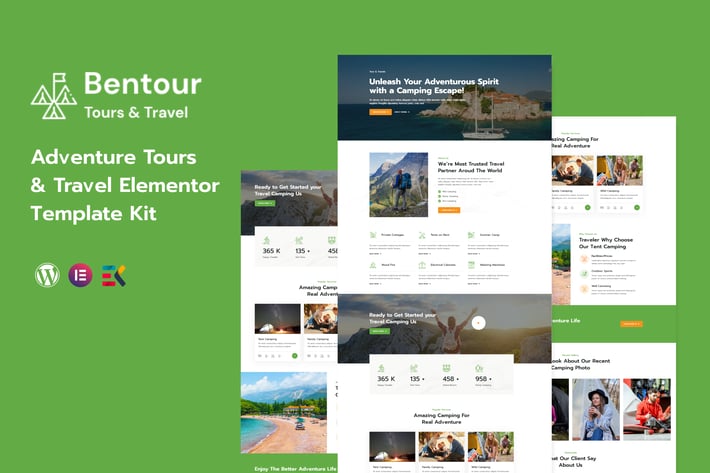
Bentour - Travel & Tour Booking Elementor Template Kit
Author
starplate
Published
Jun 15, 2025
Item Code
2dd10dfa-9cb2-4ce3-b3ad-fd57c83f04b0
How to Download
- 1 Copy the Item Code above
- 2 Go to fuckdcma.com
- 3 Paste the code in the text box and click "Generate Download Link"
About This Item
Bentour is a modern Adventure Tours and Travel Elementor Template designed for all activities, sports, hiking, or outdoor adventures. Create your online presence with our template and showcase your travel tours, display your rates and special offers, availability calendar, testimonials, and Google map. This Template will be 100% fluid and responsive on any device.
This is not a WordPress theme. Template Kits contain page content for Elementor page builder. This kit has been optimized for use with the free Hello Elementor theme but may be used with most themes that support Elementor.
Features:
Clean, Professional design
Responsive to different devices
Build with Elementor page builder
Google fonts
Social links
Templates:
Global Styles
Page – Home
Page – About
Page – Gallery
Page – FAQ Page
Page – 404 Page
Page – Destination
Page – Destination Details
Page – Blog
Page – Blog Details
Page – Contact
Section – Header
Section – Footer
Required Addons
Elementor
ElementsKit Lite
Elementor Header & Footer Builder
MetForm
How to Install:
1. Install and Activate the “Template Kit Import” plugin from Plugins > Add New in WordPress
2. Download your file and Do not unzip
3. Go to Tools > Import Kit and click the Upload Template Kit button.
4. Before importing a template, ensure the Install Requirements button is clicked to activate required plugins
5. For best results, do not import more than one template at a time.
6. Go to Pages and create a new page and click Edit with Elementor
7. Click the gear icon at lower-left of the builder to view page settings and choose Elementor Full Width and hide page title
8. Click the gray folder icon to access My Templates tab and then Import the page you’d like to customize
Detailed Guide:
For further support, go to Elementor > Get Help in WordPress menu.
How to Import Metforms
1. Import the metform block templates
2. Import the page template where the form appears and right-click to enable the Navigator
3. Locate and select the Metform widget and click Edit Form. Choose New, then Edit Form. The builder will appear
4. Click ‘Add Template’ grey folder icon.
5. Click ‘My Templates’ tab.
6. Choose your imported metform template, then click ‘Insert’ (click No for page settings).
7. Once the template is loaded, make any desired customizations and click ‘Update & Close’ The form will appear in the template
8. Click Update
This Template Kit uses demo images from Envato Elements. You will need to license these images from Envato Elements to use them on your website, or you can substitute them with your own.
This is not a WordPress theme. Template Kits contain page content for Elementor page builder. This kit has been optimized for use with the free Hello Elementor theme but may be used with most themes that support Elementor.
Features:
Clean, Professional design
Responsive to different devices
Build with Elementor page builder
Google fonts
Social links
Templates:
Global Styles
Page – Home
Page – About
Page – Gallery
Page – FAQ Page
Page – 404 Page
Page – Destination
Page – Destination Details
Page – Blog
Page – Blog Details
Page – Contact
Section – Header
Section – Footer
Required Addons
Elementor
ElementsKit Lite
Elementor Header & Footer Builder
MetForm
How to Install:
1. Install and Activate the “Template Kit Import” plugin from Plugins > Add New in WordPress
2. Download your file and Do not unzip
3. Go to Tools > Import Kit and click the Upload Template Kit button.
4. Before importing a template, ensure the Install Requirements button is clicked to activate required plugins
5. For best results, do not import more than one template at a time.
6. Go to Pages and create a new page and click Edit with Elementor
7. Click the gear icon at lower-left of the builder to view page settings and choose Elementor Full Width and hide page title
8. Click the gray folder icon to access My Templates tab and then Import the page you’d like to customize
Detailed Guide:
For further support, go to Elementor > Get Help in WordPress menu.
How to Import Metforms
1. Import the metform block templates
2. Import the page template where the form appears and right-click to enable the Navigator
3. Locate and select the Metform widget and click Edit Form. Choose New, then Edit Form. The builder will appear
4. Click ‘Add Template’ grey folder icon.
5. Click ‘My Templates’ tab.
6. Choose your imported metform template, then click ‘Insert’ (click No for page settings).
7. Once the template is loaded, make any desired customizations and click ‘Update & Close’ The form will appear in the template
8. Click Update
This Template Kit uses demo images from Envato Elements. You will need to license these images from Envato Elements to use them on your website, or you can substitute them with your own.
More from starplate
View all →
Tecture - Architecture React Next Js Template
by starplate
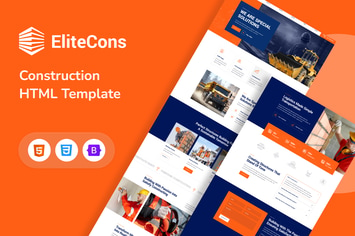
Elitecons - Construction Building HTML Template
by starplate

Xafran - Architecture HTML Template
by starplate
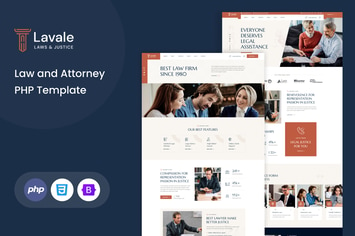
Lavale | Law and Attorney PHP Template
by starplate
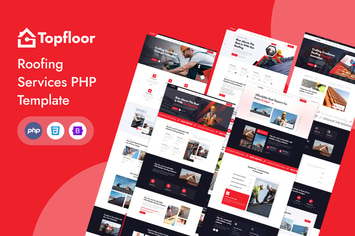
Topfloor - Roofing Services PHP Template
by starplate

Lockdown - Security & CCTV Service HTML Template
by starplate

Tecture - Architecture & Interior PHP Template
by starplate
You May Also Like

Carlax
by AncoraThemes
NEX-Forms - Conditional Content Blocks Add-on
by Basix

Le Truffe
by ThemeREX
Seil - A Responsive WordPress Blog Theme
by VictorThemes

Brixey – Responsive Architecture WordPress Theme
by VictorThemes

Health Center - Medical WordPress theme
by disgogo

Charlostin - Hotel & Resort Booking WordPress
by shtheme

Custom Made | Jewelry Manufacturer and Store
by axiomthemes