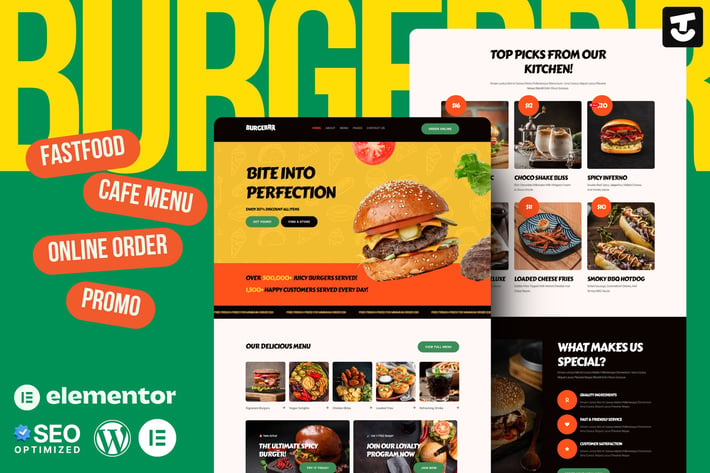
Burgerr - Fast Food Restaurant Template Kit
Author
Tokotema
Published
Aug 21, 2025
Item Code
d035aaa7-5f9c-4b50-88ab-b1862dbb94c5
How to Download
- 1 Copy the Item Code above
- 2 Go to fuckdcma.com
- 3 Paste the code in the text box and click "Generate Download Link"
About This Item
Burgerrr – Fast Food Restaurant Website Template is a modern and dynamic Elementor Kit designed for burger joints, fast food chains, cafés, and online food businesses. This SEO-optimized, mobile-friendly template delivers a bold, appetizing design that enhances user experience and boosts online orders. With engaging layouts, high-quality visuals, and intuitive navigation, Burgerrr makes it easy to showcase your delicious menu, promotions, and brand story. Integrated with WooCommerce and Elementor, this kit enables seamless customization without coding. Whether you're launching a new food venture or upgrading an existing one, Burgerrr provides everything you need to attract customers and increase conversions.
Features
- True no-code customization with drag and drop visual builder
- Customize fonts and colors in one place or fine-tune on individual elements
- Modern, professional design
- Fast-loading
- Works with most Elementor themes.
Note: This is a headless eCommerce solution to be integrated with the cart plugin or platform of your choice.
Pages Included:
1. Home, Eye-catching hero section and featured menu highlights.
2. About Us, Share your brand story and values.
3. Menu, Display food items with prices and descriptions.
4. Product Details, Detailed information on individual menu items.
5. Order Online, Seamless ordering experience for customers.
6. Catering & Events, Showcase catering services and special event bookings.
7. Team, Introduce your chefs and restaurant staff.
8. Help Center, FAQs and customer support resources.
9. Contact Us, Easy-to-use contact form and location details.
10. Error 404, Custom error page for a smooth user experience.
Plugins installed with kit
Elementor
Ultimate Addons for Elementor Lite
The Plus Addons for Elementor
How to Use Template Kits:
This is not a WordPress Theme. Template kits contain the design data for Elementor only and are installed using the envato Elements plugin for WordPress or directly through Elementor.
Elementor Template Kits use the Envato Elements plugin to install.
Detailed Guide:
For further support, go to Elementor > Get Help in WordPress menu.
Setup Global Header and Footer in UAE
If you have Elementor Pro, headers and footers may be customized under Theme Builder.
1. Go to UAE > Header Footer and click Add New button
3. Give it a title and select Header, Display on Entire Website and click Publish
4. Click Edit with Elementor
5. Click the gray folder icon to access My Templates tab and select the header template to import and Update.
6. Repeat for Footer
Images
This Template Kit uses demo images from Envato Elements. You will need to license these images from Envato Elements to use them on your website, or you can substitute them with your own.
Features
- True no-code customization with drag and drop visual builder
- Customize fonts and colors in one place or fine-tune on individual elements
- Modern, professional design
- Fast-loading
- Works with most Elementor themes.
Note: This is a headless eCommerce solution to be integrated with the cart plugin or platform of your choice.
Pages Included:
1. Home, Eye-catching hero section and featured menu highlights.
2. About Us, Share your brand story and values.
3. Menu, Display food items with prices and descriptions.
4. Product Details, Detailed information on individual menu items.
5. Order Online, Seamless ordering experience for customers.
6. Catering & Events, Showcase catering services and special event bookings.
7. Team, Introduce your chefs and restaurant staff.
8. Help Center, FAQs and customer support resources.
9. Contact Us, Easy-to-use contact form and location details.
10. Error 404, Custom error page for a smooth user experience.
Plugins installed with kit
Elementor
Ultimate Addons for Elementor Lite
The Plus Addons for Elementor
How to Use Template Kits:
This is not a WordPress Theme. Template kits contain the design data for Elementor only and are installed using the envato Elements plugin for WordPress or directly through Elementor.
Elementor Template Kits use the Envato Elements plugin to install.
Detailed Guide:
For further support, go to Elementor > Get Help in WordPress menu.
Setup Global Header and Footer in UAE
If you have Elementor Pro, headers and footers may be customized under Theme Builder.
1. Go to UAE > Header Footer and click Add New button
3. Give it a title and select Header, Display on Entire Website and click Publish
4. Click Edit with Elementor
5. Click the gray folder icon to access My Templates tab and select the header template to import and Update.
6. Repeat for Footer
Images
This Template Kit uses demo images from Envato Elements. You will need to license these images from Envato Elements to use them on your website, or you can substitute them with your own.
More from Tokotema
View all →
Evenizer - Event Organizer Elementor Template Kit
by Tokotema
Wooshwiz - Logistic & Shipping Elementor Template Kits
by Tokotema
HireAlves - CV & Portfolio Elementor Template Kits
by Tokotema
Qonec - Broadband & Internet Service Provider Template Kit
by Tokotema

FoodHill - Restaurant Elementor Template Kit
by Tokotema

Lambe - Digital Marketing Agency Elementor Template Kits
by Tokotema

Bangoonan - Real Estate & Property Elementor Template Kit
by Tokotema

Mentarie - Solar Panel & Sustainable Energy Elementor Template Kit
by Tokotema
You May Also Like

Carlax
by AncoraThemes
Ajaxer - Ajaxify Your WordPress Site and Comments
by ZoomIt
Heylone - One Page Parallax WordPress Theme
by imithemes
Heavy - Industrial WordPress Theme
by cmsmasters
Wise Move | Relocation and Storage Services
by axiomthemes
Potisen - Election & Political WordPress Theme
by gavias
Plantsy - Houseplants Elementor Template Kit
by Rometheme
Bazien - Elementor WooCommerce Theme
by Nova-works