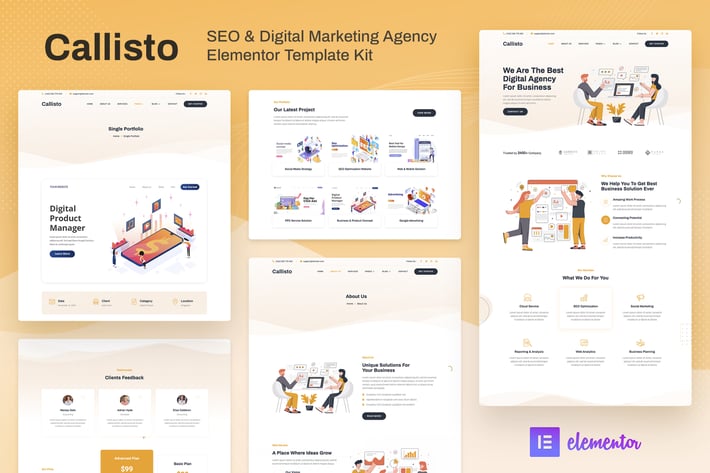
Callisto - SEO & Digital Marketing Agency Elementor Template Kit
Author
baliniz
Published
Dec 31, 2022
Item Code
1cb64a6a-1bb4-47e3-bd47-5d56da4cb434
How to Download
- 1 Copy the Item Code above
- 2 Go to fuckdcma.com
- 3 Paste the code in the text box and click "Generate Download Link"
About This Item
Callisto is a modern ready-to-use Elementor Template Kit specially designed for Digital Marketing Agencies, SEO Agencies, Online Marketing, SMM experts, Web Studios, Advertising Agencies, Lead Generation specialists, and other Marketing Firms. Attract clients with a fresh design, present services with eye-catching illustrations to get more attention.
This template kit includes stunning carefully crafted 16+ stunning templates, you can build your professional-looking company business website at an affordable price just in a click away!
Features:
Using Free Plugins (Elementor Pro is not required)
Modern & Clean Design
16+ Ready to use templates
Fully Responsive Layout
Retina Ready
Fully Customizable
Cross Browser Compatibility: Chrome, Firefox, Safari, Opera
Templates Include:
Home
About Us
Services
Our Team
Pricing
FAQ
Portfolio
Single Portfolio
Blog
Single Blog
Contact
MetForm Contact
404 Page
Header
Footer
Global Theme Style
Required Plugin:
Elementor
ElementsKit Lite
Press Elements - Widgets for Elementor
MetForm
How to Install:
Install and Activate the Envato Elements plugin from Plugins > Add New in WordPress, then activate your subscription. Premium kits may be loaded directly from the Premium Kits library.
Manual import: Do not unzip the download. Upload the Kit zip under Elements> Installed Kits by clicking the Import Kit button. Before importing a template, ensure the Install Requirements button is clicked to activate required plugins. For best results, do not import more than one template at a time.
How to import Metforms and content blocks
- Import metform and content blocks/slide templates
- Import the template where the form or slide appears, then click View Template to load in the builder
- Right click the page to open the Navigator and locate the Metform widgets
- For metforms, click New, leave blank selected then click Edit Form button
- Click ‘Add Template’ grey folder icon.
- Click ‘My Templates’ tab.
- Choose your imported metform template, then click ‘Insert’.
- Once the template is loaded, click ‘Update’.
Notes:
This Template Kit uses demo images from Envato Elements. You will need to license these images from Envato Elements to use them on your website, or you can substitute them with your own.
This template kit includes stunning carefully crafted 16+ stunning templates, you can build your professional-looking company business website at an affordable price just in a click away!
Features:
Using Free Plugins (Elementor Pro is not required)
Modern & Clean Design
16+ Ready to use templates
Fully Responsive Layout
Retina Ready
Fully Customizable
Cross Browser Compatibility: Chrome, Firefox, Safari, Opera
Templates Include:
Home
About Us
Services
Our Team
Pricing
FAQ
Portfolio
Single Portfolio
Blog
Single Blog
Contact
MetForm Contact
404 Page
Header
Footer
Global Theme Style
Required Plugin:
Elementor
ElementsKit Lite
Press Elements - Widgets for Elementor
MetForm
How to Install:
Install and Activate the Envato Elements plugin from Plugins > Add New in WordPress, then activate your subscription. Premium kits may be loaded directly from the Premium Kits library.
Manual import: Do not unzip the download. Upload the Kit zip under Elements> Installed Kits by clicking the Import Kit button. Before importing a template, ensure the Install Requirements button is clicked to activate required plugins. For best results, do not import more than one template at a time.
How to import Metforms and content blocks
- Import metform and content blocks/slide templates
- Import the template where the form or slide appears, then click View Template to load in the builder
- Right click the page to open the Navigator and locate the Metform widgets
- For metforms, click New, leave blank selected then click Edit Form button
- Click ‘Add Template’ grey folder icon.
- Click ‘My Templates’ tab.
- Choose your imported metform template, then click ‘Insert’.
- Once the template is loaded, click ‘Update’.
Notes:
This Template Kit uses demo images from Envato Elements. You will need to license these images from Envato Elements to use them on your website, or you can substitute them with your own.
More from baliniz
View all →
Hiro – Human Resources & Recruitment Agency Elementor Template Kit
by baliniz
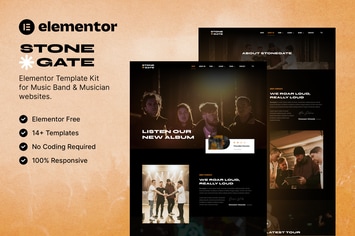
Stonegate – Music Band & Musician Elementor Template Kit
by baliniz
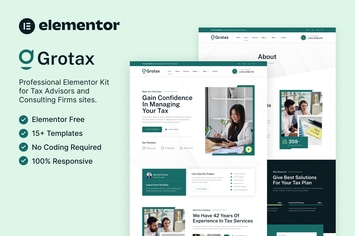
Grotax – Tax Advisor & Consulting Firm Elementor Template Kit
by baliniz

Socialzy – Social Media Marketing Agency Elementor Template Kit
by baliniz

Chemisty – Science Research & Laboratory Elementor Template Kit
by baliniz

Yogist – Yoga Studio & Fitness Club Elementor Template Kit
by baliniz

Cleany – Cleaning Service Company Elementor Template Kit
by baliniz

Hypefit – Personal Trainer & Fitness Elementor Template Kit
by baliniz
You May Also Like

Optima - Multipurpose WordPress Theme
by LA-Studio

Animo – Creative & Clean Multi-Purpose WordPress T
by theme_bubble

Narration - A Responsive WordPress Blog Theme
by imithemes
Talos - Creative Multipurpose WordPress Theme
by OceanThemes

Bookflare - A Modern Education & LMS WordPress The
by themesflat
WordPress File Embed - Viewer Plugin
by Elfsight

Mgana - Clean, Minimal WooCommerce Theme
by LA-Studio
VAUSS - Portfolio and Personal Services
by payothemes