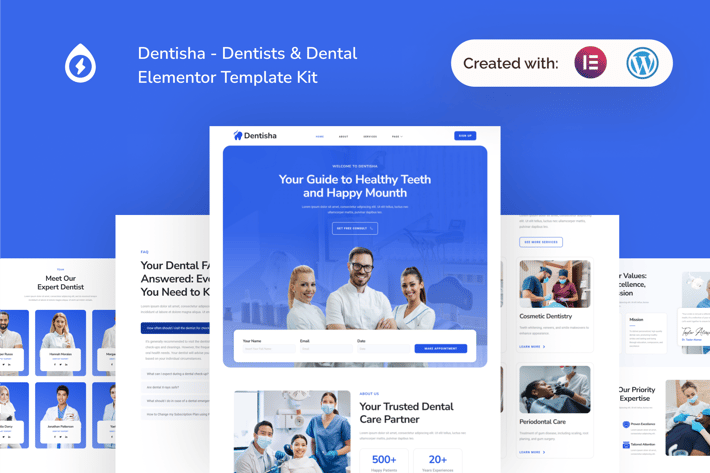
Dentisha - Dentists & Dental Elementor Template Kit
Author
sparklethings
Published
Dec 22, 2024
Item Code
a6195178-3761-4c37-97f9-2b3956ad1323
How to Download
- 1 Copy the Item Code above
- 2 Go to fuckdcma.com
- 3 Paste the code in the text box and click "Generate Download Link"
About This Item
Introducing Dentisha a comprehensive template kit meticulously crafted for dentists and dental clinics, exclusively for WordPress. Designed with precision and leveraging free plugins, Dentisha empowers dental professionals to establish a captivating online presence without the need for intricate development. Tailored specifically for dental practices, orthodontists, and dental care centers.
Note: This is not a WordPress theme. Template Kits contain page content for the Elementor page builder for WordPress that give you the freedom to design without lock-in. This kit has been optimized for use with the free Hello Elementor theme but may be used with most themes that support Elementor.
Suitable For:
- Dentists
- Dental Clinics
- Orthodontists
Features:
- Using Free Elementor (Elementor Pro is not required)
- Unique & Clean Design
- Modern Design
- Build With Container
- 14 Ready to Use Pages
- Unlimited colors
- More than 900 Ready Fonts
- Fully Responsive Layout
- Fully Customizable
Cross Browser Compatibility: Chrome, Firefox, Safari, Opera
Templates Included:
- Global Theme Style
- Home
- About
- Services
- Team
- Doctor Detail
- Pricing
- Testimonial
- FAQ
- Error 404
- Blog Post
- Single Post
- Contact Us
- Header
- Footer
Required Plugin:
- Elementor
- ElementsKit Lite
- MetForm
- Gum Elementor Addon
- Elementor Header & Footer Builder
How To Install:
1. Install and Activate the “Envato Elements” plugin from Plugins > Add New in WordPress.
2. Download your kit file and Do not unzip.
3. Go to Elements > Installed Kits and click the Upload Template Kit button. You may also import automatically by clicking Connect Account to link your Elements subscription, then import under Elements > Template Kits.
4. Check for the orange banner at the top and click Install Requirements to load any plugins the kit uses.
5. Click import on the Global Kit Styles first.
6. Click Import on one template at a time. These are stored in Elementor under Templates > Saved Templates.
7. Go to Pages and create a new page and click Edit with Elementor.
8. Click the gear icon at lower-left of the builder to view page settings and choose Elementor Full Width and hide page title.
9. Click the gray folder icon to access My Templates tab and then Import the page you’d like to customize.
This Template Kit uses demo images from Envato Elements. You will need to license these images from Envato Elements to use them on your website, or you can substitute them with your own.
Best Regard, Gonang
Note: This is not a WordPress theme. Template Kits contain page content for the Elementor page builder for WordPress that give you the freedom to design without lock-in. This kit has been optimized for use with the free Hello Elementor theme but may be used with most themes that support Elementor.
Suitable For:
- Dentists
- Dental Clinics
- Orthodontists
Features:
- Using Free Elementor (Elementor Pro is not required)
- Unique & Clean Design
- Modern Design
- Build With Container
- 14 Ready to Use Pages
- Unlimited colors
- More than 900 Ready Fonts
- Fully Responsive Layout
- Fully Customizable
Cross Browser Compatibility: Chrome, Firefox, Safari, Opera
Templates Included:
- Global Theme Style
- Home
- About
- Services
- Team
- Doctor Detail
- Pricing
- Testimonial
- FAQ
- Error 404
- Blog Post
- Single Post
- Contact Us
- Header
- Footer
Required Plugin:
- Elementor
- ElementsKit Lite
- MetForm
- Gum Elementor Addon
- Elementor Header & Footer Builder
How To Install:
1. Install and Activate the “Envato Elements” plugin from Plugins > Add New in WordPress.
2. Download your kit file and Do not unzip.
3. Go to Elements > Installed Kits and click the Upload Template Kit button. You may also import automatically by clicking Connect Account to link your Elements subscription, then import under Elements > Template Kits.
4. Check for the orange banner at the top and click Install Requirements to load any plugins the kit uses.
5. Click import on the Global Kit Styles first.
6. Click Import on one template at a time. These are stored in Elementor under Templates > Saved Templates.
7. Go to Pages and create a new page and click Edit with Elementor.
8. Click the gear icon at lower-left of the builder to view page settings and choose Elementor Full Width and hide page title.
9. Click the gray folder icon to access My Templates tab and then Import the page you’d like to customize.
This Template Kit uses demo images from Envato Elements. You will need to license these images from Envato Elements to use them on your website, or you can substitute them with your own.
Best Regard, Gonang
More from sparklethings
View all →







You May Also Like

Image and Video FullScreen Background WP Plugin
by LambertGroup

Versaille - Personal Blog WordPress Theme
by themeton

Lisbeth - A Lifestyle WordPress Blog Theme
by gljivec
La Boom - Food & Restaurant Bistro WordPress Theme
by SpyroPress
NEX-Forms - Form Themes Add-on
by Basix

Sticky Full Width Radio Player WordPress Plugin
by LambertGroup
Zuut - Clean Agency WordPress Theme
by themeton
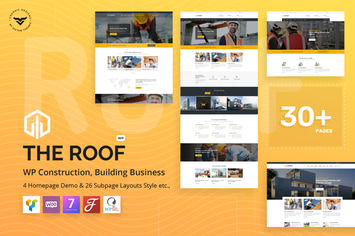
Roof - Construction, Building WordPress Theme
by VictorThemes