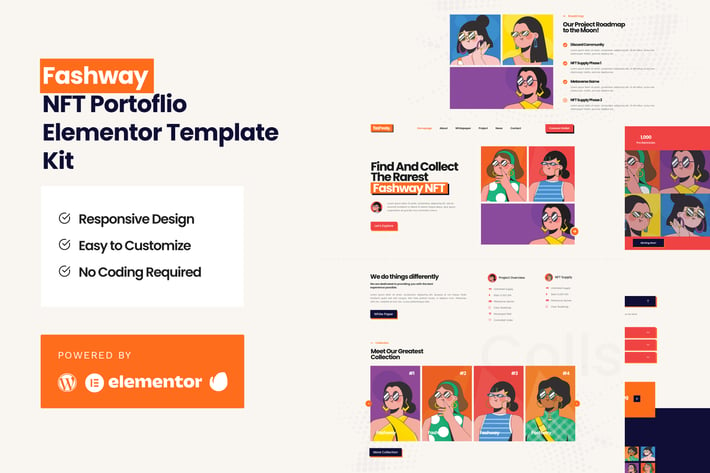
Fashway - NFT Portfolio Elementor Template Kit
Author
ibeydesign
Published
Feb 14, 2026
Item Code
8f5a0de6-e459-4269-8885-acced7927dac
How to Download
- 1 Copy the Item Code above
- 2 Go to fuckdcma.com
- 3 Paste the code in the text box and click "Generate Download Link"
About This Item
Welcome to Fashway NFT Portfolio Template Kit. This kit is design to ease your NFT Landing Page Project. It is powered with fancy collection, hero, faqs , roadmap, contact, and so on. This is not a WordPress theme. Template Kits contain page content for Elementor page builder. This kit has been optimized for use with the free Hello Elementor theme but may be used with most themes that support Elementor.
Page Templates :
Homepage
About
Collection
Whitepaper
News
Single News
Contact
Single 404
Sections and Blocks :
Header
Footer
Hero
Faqs
Roadmap
Contact
Core Value
Team Carousel
Collection
Elementor Pro upgrade is required for some templates and features (not included)
Required Plugins (will be installed automatically) :
Elementor
Premium Plugin for Elementor
Elementskit Lite
Images
Illustrations from Freepik are for dmeo purposes only and may not be used as NFT items or resold.
How to Install Template Kit:
Please Refer from this tutorial:
System Requirements to Install Elementor Kit
Memory Limit Hosting Server Should Be 512 Mb
MySQL version 5.6 or greater OR MariaDB version 10.0 or greater
PHP 7 or Greater
Wordpres 5.2 or Greater
This template not support Internet Explorer.
For More Info Kindly Visit this Guide:
How to Install the Hero Slide and Portfolio Tabs
Note: (Please Refer on our Demo for each type of Block)
Step 1: Importing the Block
1. Import “Homepage - Hero Layout – Block” section
2. Set your image and text that you desire
3. Click on arrow button, click advanced and put CSS id to “hero-2”
4. Click on arrow button again, select box URL link, set to “#/”
5. Click Update
6. Back again to Template Library
7. Duplicate “Homepage– Hero Layout – Block” Section
8. Rename it to “Hero 1”
9. And Repeat Step 1 – 4.
10. Remember Rename CSS ID in Sequence (Ex: hero-1, hero-3, and so on)
11. You may create more duplicate, just rename and sequence the CSS - ID
Note
CSS ID Sequence
1. Hero 1: hero-2
2. Hero 2: hero-3
3. Hero 3: hero-1
Step 2: Importing Homepage
1. Import the Homepage
2. Click Navigator Icon on the Left Corner
3. Select Premium Carousel
4. Choose and Open Repeater
5. Set each Repeater to Minima – Hero Layout – Block 1, 2, and 3
6. Set each Repeater the CSS ID with Hashtag (Ex: #hero-2, #hero-3, #hero-1)
7. Update
For Detail Tutorial, Click Here:
Page Templates :
Homepage
About
Collection
Whitepaper
News
Single News
Contact
Single 404
Sections and Blocks :
Header
Footer
Hero
Faqs
Roadmap
Contact
Core Value
Team Carousel
Collection
Elementor Pro upgrade is required for some templates and features (not included)
Required Plugins (will be installed automatically) :
Elementor
Premium Plugin for Elementor
Elementskit Lite
Images
Illustrations from Freepik are for dmeo purposes only and may not be used as NFT items or resold.
How to Install Template Kit:
Please Refer from this tutorial:
System Requirements to Install Elementor Kit
Memory Limit Hosting Server Should Be 512 Mb
MySQL version 5.6 or greater OR MariaDB version 10.0 or greater
PHP 7 or Greater
Wordpres 5.2 or Greater
This template not support Internet Explorer.
For More Info Kindly Visit this Guide:
How to Install the Hero Slide and Portfolio Tabs
Note: (Please Refer on our Demo for each type of Block)
Step 1: Importing the Block
1. Import “Homepage - Hero Layout – Block” section
2. Set your image and text that you desire
3. Click on arrow button, click advanced and put CSS id to “hero-2”
4. Click on arrow button again, select box URL link, set to “#/”
5. Click Update
6. Back again to Template Library
7. Duplicate “Homepage– Hero Layout – Block” Section
8. Rename it to “Hero 1”
9. And Repeat Step 1 – 4.
10. Remember Rename CSS ID in Sequence (Ex: hero-1, hero-3, and so on)
11. You may create more duplicate, just rename and sequence the CSS - ID
Note
CSS ID Sequence
1. Hero 1: hero-2
2. Hero 2: hero-3
3. Hero 3: hero-1
Step 2: Importing Homepage
1. Import the Homepage
2. Click Navigator Icon on the Left Corner
3. Select Premium Carousel
4. Choose and Open Repeater
5. Set each Repeater to Minima – Hero Layout – Block 1, 2, and 3
6. Set each Repeater the CSS ID with Hashtag (Ex: #hero-2, #hero-3, #hero-1)
7. Update
For Detail Tutorial, Click Here:
More from ibeydesign
View all →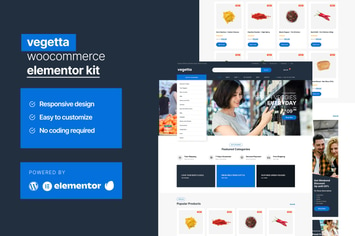
Vegetta - Supermarket Multipurpose Woocommerce Elementor Kit
by ibeydesign
Dingbat Font Vol. 06
by ibeydesign
Dingbat Font Vol. 03
by ibeydesign
Dingbat Font Vol. 05
by ibeydesign
Dingbat Font Vol. 02
by ibeydesign
Dingbat Font Vol. 01
by ibeydesign
Dingbat Font Vol. 04
by ibeydesign

ecommerce - website UI Kit
by ibeydesign
You May Also Like

MaxCube
by AncoraThemes

Cosy - Multipurpose WooCommerce WordPress Theme
by LA-Studio

Angela
by AncoraThemes
Smart - Minimal Portfolio WordPress Theme
by shtheme

MoveDo - Responsive Multipurpose WordPress theme
by greatives
Yottis
by ThemeREX
Multipurpose Messages and Social Share Builder
by Odin_Design
Blocker Firewall - WordPress Security
by divcoderPlugins