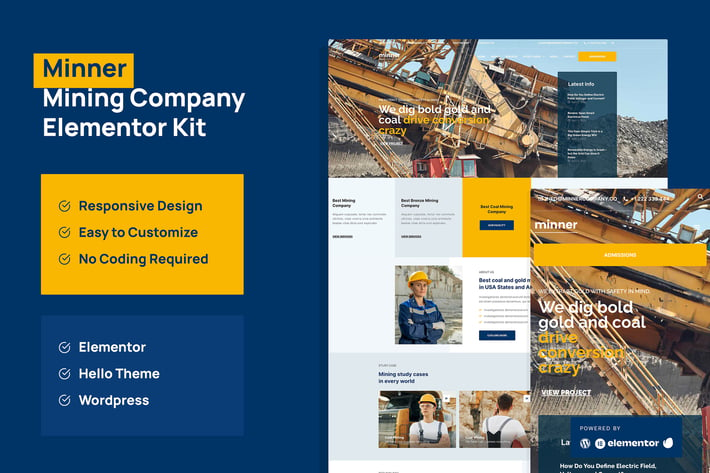
Minner - Construction & Building Elementor Template Kit
Author
portocraft
Published
Aug 09, 2024
Item Code
0a6ac057-d592-419d-86df-a57098d307fd
How to Download
- 1 Copy the Item Code above
- 2 Go to fuckdcma.com
- 3 Paste the code in the text box and click "Generate Download Link"
About This Item
Minner is Mining and Company Envato template kit. This kit is designed to optimize on Elementor and Hello Theme. You can use this template easily to finish your multipurpose company project. Get this kit to looks more professional for project.
Page Templates :
Homepage
About
Service
Study Case
Study Case Overview
News
Single News
Contact
Single 404
Sections and Blocks :
Header
Footer
Hero
Testimonial
Contact Form
Newsletter Form
Service
Feature
Plugins installed with kit :
Elementor
Premium Addons for Elementor
Elementor Pro upgrade is required for some templates and features (not included)
How to Use Template Kits:
1. Install and Activate the "Envato Elements" plugin from Plugins > Add New in WordPress
2. Download your kit file and Do not unzip
3. Go to Elements > Installed Kits and click the Upload Template Kit button. You may also import automatically by clicking Connect Account to link your Elements subscription, then import under Elements > Template Kits.
4. Check for the orange banner at the top and click Install Requirements to load any plugins the kit uses
5. Click import on the Global Kit Styles first
6. Click Import on one template at a time. These are stored in Elementor under Templates > Saved Templates.
7. Go to Pages and create a new page and click Edit with Elementor
8. Click the gear icon at lower-left of the builder to view page settings and choose Elementor Full Width and hide page title
9. Click the gray folder icon to access My Templates tab and then Import the page you'd like to customize.
If you have Elementor Pro, headers and footers may be customized under Theme Builder.
Detailed Guide:
How to Setup Slides & Tabs
1.Import the slide/tab block.You may import more than once and find copies under Templates > Saved Templates to customize.
2. Create a new page using the main page template
3.Right click the page to open the Navigator and locate the Premium Carousel or Tabs widget
4.Select the slide or tab template from the dropdowns on the general tab of the element options.
Images
This Template Kit uses demo images from Envato Elements. You will need to license these images from Envato Elements to use them on your website, or you can substitute them with your own.
Page Templates :
Homepage
About
Service
Study Case
Study Case Overview
News
Single News
Contact
Single 404
Sections and Blocks :
Header
Footer
Hero
Testimonial
Contact Form
Newsletter Form
Service
Feature
Plugins installed with kit :
Elementor
Premium Addons for Elementor
Elementor Pro upgrade is required for some templates and features (not included)
How to Use Template Kits:
1. Install and Activate the "Envato Elements" plugin from Plugins > Add New in WordPress
2. Download your kit file and Do not unzip
3. Go to Elements > Installed Kits and click the Upload Template Kit button. You may also import automatically by clicking Connect Account to link your Elements subscription, then import under Elements > Template Kits.
4. Check for the orange banner at the top and click Install Requirements to load any plugins the kit uses
5. Click import on the Global Kit Styles first
6. Click Import on one template at a time. These are stored in Elementor under Templates > Saved Templates.
7. Go to Pages and create a new page and click Edit with Elementor
8. Click the gear icon at lower-left of the builder to view page settings and choose Elementor Full Width and hide page title
9. Click the gray folder icon to access My Templates tab and then Import the page you'd like to customize.
If you have Elementor Pro, headers and footers may be customized under Theme Builder.
Detailed Guide:
How to Setup Slides & Tabs
1.Import the slide/tab block.You may import more than once and find copies under Templates > Saved Templates to customize.
2. Create a new page using the main page template
3.Right click the page to open the Navigator and locate the Premium Carousel or Tabs widget
4.Select the slide or tab template from the dropdowns on the general tab of the element options.
Images
This Template Kit uses demo images from Envato Elements. You will need to license these images from Envato Elements to use them on your website, or you can substitute them with your own.
More from portocraft
View all →
Rampack Handwritten Brush Texture
by portocraft

Amstromato Script Signature
by portocraft

Florence Vintage Sans Serif
by portocraft
Terminator - Business & Pest Control Elementor Pro Template Kit
by portocraft
Florine Brand Fashion Keynote
by portocraft

Sandsea Graceful Font
by portocraft

Archie Minimal Keynote Template
by portocraft
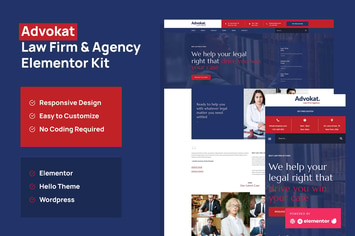
Advokat - Law Firm & Agency Elementor Template Kit
by portocraft
You May Also Like
SNS BiaMuc - WooCommerce WordPress Theme
by snstheme

Zuka - Clean, Minimal WooCommerce Theme
by LA-Studio

Sweet Dessert
by axiomthemes
Barley
by bkninja
Vilan Corporate, Shop & Forum WordPress Theme
by disgogo
Caliris - Responsive One Page WordPress Theme
by CocoBasic
PineCone - Creative Portfolio and Blog for Agency
by mallini
Onetrav - Travel Agency Elementor Template Kit
by onecontributor