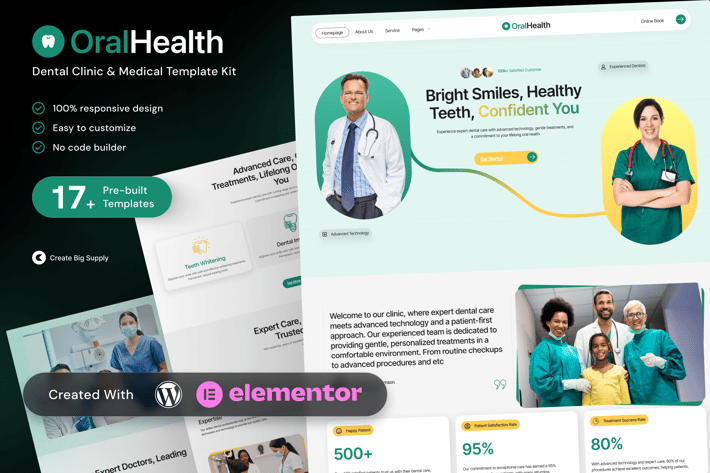
OralHealth - Dental Clinic & Medical Elementor Template Kit
Author
CreateBigSupply
Published
Nov 29, 2025
Item Code
58745ecc-2bbb-4c47-8e94-1218cb0811c7
How to Download
- 1 Copy the Item Code above
- 2 Go to fuckdcma.com
- 3 Paste the code in the text box and click "Generate Download Link"
About This Item
OralHealth is a clean and professional Elementor Template Kit built for dental clinics, medical practices, and healthcare providers. With a modern and welcoming layout, it helps clinics present their services, introduce practitioners, and provide easy access to booking or consultations.
Whether you're offering general dentistry, orthodontics, cosmetic procedures, or other medical services, OralHealth is structured to establish trust and guide patients toward taking action. Built entirely with Elementor Free and fully responsive across all devices.
Key Features:
18 ready to use page templates
Using Free Plugins (Elementor Pro is not required)
Cross Browser Compatibility: Chrome, Firefox, Safari, Opera
Built with Free Plugins, no premium add ons required, making setup hassle free
100% Fully Responsive and mobile friendly
Customize fonts and colors in one place (Global Kit Style)
One Click Installation – Import demo content easily with the Envato Elements plugin
Modern and Professional Design – Perfect for dental clinics, orthodontists, and medical services
Perfect for dental clinics and medical professionals
Service oriented design with strong call to actions
Mobile friendly and SEO optimized
Built with Elementor Free, no coding required
Includes testimonials, FAQs, and contact forms
Perfect for:
Dental Clinics and Orthodontists
Medical and Healthcare Centers
Private Dental Practices
Oral Care and Cosmetic Dentistry Services
Templates in Zip:
Global Style
Homepage
About Us
Service
Book Appointment
Pricing Plan
Testimonials
FAQ
Contact Us
Blog/Insight
Before and After Gallery
Meet The Doctors
Emergency Dental Care
Coming Soon
404 Error Page
Header
Footer
Required Plugins:
Elementor
MetForm
ElementsKit Lite
Ultimate Addons for Elementor
* RomethemeKit For Elementor
How to Use Template Kit:
This is not a WordPress Theme. Template kits contain the design data for Elementor only and are installed using the Envato Elements plugin for WordPress or directly through Elementor.
1. Download your kit file from Envato and do not unzip it. If you use Safari browser, you may need to ensure "Open safe files after downloading" is disabled in the browser preferences.
2. Go to Settings > Permalinks and ensure Post Name is selected.
3. Go to Appearance > Themes > Add New and ensure Hello Elementor is installed and activated. This will prompt you to install Elementor if you haven't already.
4. Go to Plugins and ensure Elementor and Envato Elements are installed and at the latest version. If your kit requires Elementor Pro, it must be installed now and connected to your account.
5. Go to Elements > Installed Kits and click Upload Template Kit Zip (or click your kit to view it).
6. Check for the orange banner at the top and click Install Requirements to load any plugins the kit uses.
7. Click Import on the Global Kit Styles first. This will set up the site settings.
8. Click Import on one template at a time in the order shown. These are stored in Elementor under Templates > Saved Templates and are reused from here.
Creating Pages:
1. Go to Pages and create a new page, then click Edit with Elementor.
2. Click the gear icon at lower left of the builder to view page settings and choose Elementor Full Width and hide the page title.
3. Click the gray folder icon to access My Templates tab, then import the page you'd like to customize.
4. The home page is set under Settings > Reading by selecting Static Front Page.
If you have Elementor Pro, headers and footers are customized under Templates > Theme Builder.
Detailed Guide:
How to Import Metforms:
If you have Elementor Pro, skip install of Metform and form blocks.
1. Import the MetForm block templates.
2. Import the page template where the form appears and right click to enable the Navigator.
3. Locate and select the MetForm widget and click Edit Form. Choose New, then Edit Form. The builder will appear.
4. Click Add Template (gray folder icon).
5. Click My Templates tab.
6. Choose your imported MetForm template, then click Insert (click No for page settings).
7. Once the template is loaded, make any desired customizations and click Update & Close. The form will appear in the template.
8. Click Update.
Setup Global Header and Footer in UAE:
If you have Elementor Pro, headers and footers may be customized under Theme Builder.
1. Go to UAE > Header Footer and click Add New button.
2. Give it a title and select Header, display on Entire Website and click Publish.
3. Click Edit with Elementor.
4. Click the gray folder icon to access My Templates tab and select the header template to import and click Update.
5. Repeat for Footer.
Images:
This Template Kit uses demo images from Envato Elements. You will need to license these images from Envato Elements to use them on your website, or you can substitute them with your own.
OralHealth is the ideal template kit for dental clinics and medical centers looking to grow their online visibility and build trust with patients through a clean, modern website.
Whether you're offering general dentistry, orthodontics, cosmetic procedures, or other medical services, OralHealth is structured to establish trust and guide patients toward taking action. Built entirely with Elementor Free and fully responsive across all devices.
Key Features:
18 ready to use page templates
Using Free Plugins (Elementor Pro is not required)
Cross Browser Compatibility: Chrome, Firefox, Safari, Opera
Built with Free Plugins, no premium add ons required, making setup hassle free
100% Fully Responsive and mobile friendly
Customize fonts and colors in one place (Global Kit Style)
One Click Installation – Import demo content easily with the Envato Elements plugin
Modern and Professional Design – Perfect for dental clinics, orthodontists, and medical services
Perfect for dental clinics and medical professionals
Service oriented design with strong call to actions
Mobile friendly and SEO optimized
Built with Elementor Free, no coding required
Includes testimonials, FAQs, and contact forms
Perfect for:
Dental Clinics and Orthodontists
Medical and Healthcare Centers
Private Dental Practices
Oral Care and Cosmetic Dentistry Services
Templates in Zip:
Global Style
Homepage
About Us
Service
Book Appointment
Pricing Plan
Testimonials
FAQ
Contact Us
Blog/Insight
Before and After Gallery
Meet The Doctors
Emergency Dental Care
Coming Soon
404 Error Page
Header
Footer
Required Plugins:
Elementor
MetForm
ElementsKit Lite
Ultimate Addons for Elementor
* RomethemeKit For Elementor
How to Use Template Kit:
This is not a WordPress Theme. Template kits contain the design data for Elementor only and are installed using the Envato Elements plugin for WordPress or directly through Elementor.
1. Download your kit file from Envato and do not unzip it. If you use Safari browser, you may need to ensure "Open safe files after downloading" is disabled in the browser preferences.
2. Go to Settings > Permalinks and ensure Post Name is selected.
3. Go to Appearance > Themes > Add New and ensure Hello Elementor is installed and activated. This will prompt you to install Elementor if you haven't already.
4. Go to Plugins and ensure Elementor and Envato Elements are installed and at the latest version. If your kit requires Elementor Pro, it must be installed now and connected to your account.
5. Go to Elements > Installed Kits and click Upload Template Kit Zip (or click your kit to view it).
6. Check for the orange banner at the top and click Install Requirements to load any plugins the kit uses.
7. Click Import on the Global Kit Styles first. This will set up the site settings.
8. Click Import on one template at a time in the order shown. These are stored in Elementor under Templates > Saved Templates and are reused from here.
Creating Pages:
1. Go to Pages and create a new page, then click Edit with Elementor.
2. Click the gear icon at lower left of the builder to view page settings and choose Elementor Full Width and hide the page title.
3. Click the gray folder icon to access My Templates tab, then import the page you'd like to customize.
4. The home page is set under Settings > Reading by selecting Static Front Page.
If you have Elementor Pro, headers and footers are customized under Templates > Theme Builder.
Detailed Guide:
How to Import Metforms:
If you have Elementor Pro, skip install of Metform and form blocks.
1. Import the MetForm block templates.
2. Import the page template where the form appears and right click to enable the Navigator.
3. Locate and select the MetForm widget and click Edit Form. Choose New, then Edit Form. The builder will appear.
4. Click Add Template (gray folder icon).
5. Click My Templates tab.
6. Choose your imported MetForm template, then click Insert (click No for page settings).
7. Once the template is loaded, make any desired customizations and click Update & Close. The form will appear in the template.
8. Click Update.
Setup Global Header and Footer in UAE:
If you have Elementor Pro, headers and footers may be customized under Theme Builder.
1. Go to UAE > Header Footer and click Add New button.
2. Give it a title and select Header, display on Entire Website and click Publish.
3. Click Edit with Elementor.
4. Click the gray folder icon to access My Templates tab and select the header template to import and click Update.
5. Repeat for Footer.
Images:
This Template Kit uses demo images from Envato Elements. You will need to license these images from Envato Elements to use them on your website, or you can substitute them with your own.
OralHealth is the ideal template kit for dental clinics and medical centers looking to grow their online visibility and build trust with patients through a clean, modern website.
More from CreateBigSupply
View all →
Balloon Script Font
by CreateBigSupply

Charlie Delightful Script Font
by CreateBigSupply
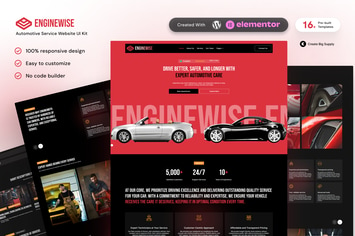
EngineWise - Automotive Service Elementor Template Kit
by CreateBigSupply

Modern Elegant Display Serif Typeface for Fashion
by CreateBigSupply
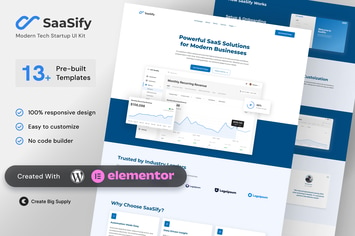
SaaSify - Modern Tech Startup Elementor Template Kit
by CreateBigSupply
Brogman – Elegant Minimalist Sans Serif Display
by CreateBigSupply
Clinicare - Elementor Template Kit Health & Medical Websites
by CreateBigSupply
Varelia – Modern Sans Serif Display Typeface
by CreateBigSupply
You May Also Like
Maxima - Minimal Blog & Magazine WordPress Theme
by aspirethemes
PetMark - Responsive WooCommerce WordPress Theme
by roadthemes

Emberlyn
by AncoraThemes
BodyCenter - Fitness WooCommerce WordPress Theme
by snstheme
Logo Showcase - Logo Addons for WPBakery - WP
by ad-theme
Villenoir - Vineyard, Winery & Wine Shop
by disgogo

Hakim | Attorney and Lawyer WordPress Theme
by themesawesome
Interior Arc - Architecture WordPress Theme
by shtheme