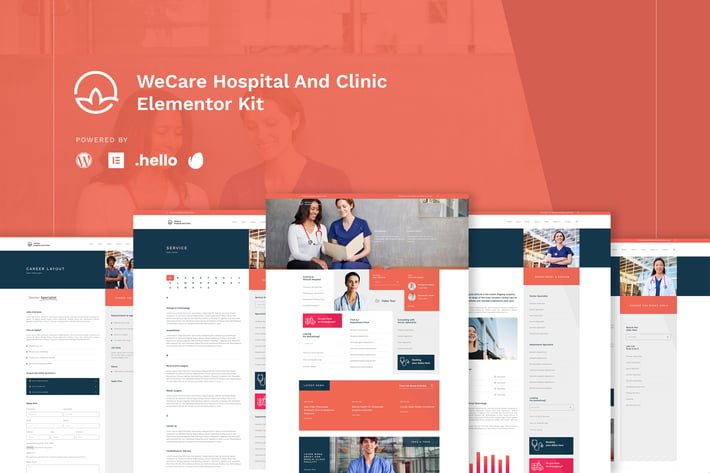
WeCare - Hospital & Clinic Elementor Template Kit
Author
NissaStudio
Published
Sep 11, 2021
Item Code
a67ff780-a8c6-4e00-859e-d29f8c6890d9
How to Download
- 1 Copy the Item Code above
- 2 Go to fuckdcma.com
- 3 Paste the code in the text box and click "Generate Download Link"
About This Item
Are you tired to find a Real Hospital Template for your healthcare project? Or your client has ton of department and staff to show on website? Then, WeCare is the Best Option for your Project. WeCare Hospital and Clinic Template is designed after some research to Hospital, Patient and Public to look what they expect on Hospital Website. And the result is they want a Hospital website that full ton of Information where they should to go and what Doctor and Department Available there, therefore, we designed this kit to meet their UX requirements.
This kit is totally different from another hospital kit with unused fancy image and animation for end user. This is kit designed to meet the user experience (UX) ease; so, you may find many index lists of information. Also, this kit powered with many layout pages that hospital and clinic need.
Page Templates :
Homepage
About Page
Career List Page
Career Layout Page
Service List Page
Service Page Layout
Doctor List Page
Doctor Page Layout
Blog
Single Blog
Contact
Single 404
Single Search Result
Sections :
Header Style 1
Header Style 2
Testimonial
Career Slider
Team Slider
Doctor Slider
Hero Slider
Service Tabs
Required Plugins (will be installed automatically) :
Elementor
Premium Plugin for Elementor
Happy Addon Plugin for Elementor
Element Kit Lite For Elementor
Essential Addon
Sticky Header for Elementor
Required Plugin (Installed Separately):
Elementor Pro
How to Install the Hero Slider
Import the slider
Make the copy of main slider
Import the homepage
Click section to Carousel Widget
Choose Repeater Tab and Choose the Slide Template
Set the hashtag of each slide (For Instanse #slidelayout-1)
Go to Main Slider Section,
Click the color button of the slide
Click Advance and set the CSS ID to slidelayout-1 (without hash)
Images
This Template Kit uses demo images from Envato Elements. You will need to license these images from Envato Elements to use them on your website, or you can substitute them with your own.
This kit is totally different from another hospital kit with unused fancy image and animation for end user. This is kit designed to meet the user experience (UX) ease; so, you may find many index lists of information. Also, this kit powered with many layout pages that hospital and clinic need.
Page Templates :
Homepage
About Page
Career List Page
Career Layout Page
Service List Page
Service Page Layout
Doctor List Page
Doctor Page Layout
Blog
Single Blog
Contact
Single 404
Single Search Result
Sections :
Header Style 1
Header Style 2
Testimonial
Career Slider
Team Slider
Doctor Slider
Hero Slider
Service Tabs
Required Plugins (will be installed automatically) :
Elementor
Premium Plugin for Elementor
Happy Addon Plugin for Elementor
Element Kit Lite For Elementor
Essential Addon
Sticky Header for Elementor
Required Plugin (Installed Separately):
Elementor Pro
How to Install the Hero Slider
Import the slider
Make the copy of main slider
Import the homepage
Click section to Carousel Widget
Choose Repeater Tab and Choose the Slide Template
Set the hashtag of each slide (For Instanse #slidelayout-1)
Go to Main Slider Section,
Click the color button of the slide
Click Advance and set the CSS ID to slidelayout-1 (without hash)
Images
This Template Kit uses demo images from Envato Elements. You will need to license these images from Envato Elements to use them on your website, or you can substitute them with your own.
More from NissaStudio
View all →

You May Also Like

Airi - Clean, Minimal WooCommerce Theme
by LA-Studio

CF7 Auto Responder Addon
by kamleshyadav
Soccer Club - Football Team WordPress Theme
by axiomthemes

ConFix
by ThemeREX
Burger Food Truck - Popup Restaurant Elementor Template Kit
by themosaurus
TFMiniCart&Product - WooCommerce Product, Mini Car
by themesflat
Lumina - Creatives & Business Elementor Template Kit
by styleWish
Creativic - Creative Agency Elementor Template Kit
by pinisiart